𝐃𝐚𝐲 𝟗𝟔 of #100DaysOfCode
- 𝑼𝒔𝒊𝒏𝒈 𝑾𝒐𝒓𝒌𝒆𝒓 𝑻𝒉𝒓𝒆𝒂𝒅𝒔 𝒇𝒐𝒓 𝑯𝒆𝒂𝒗𝒚 𝑳𝒊𝒇𝒕𝒊𝒏𝒈 -
𝘞𝘩𝘢𝘵 𝘪𝘴 𝘢 𝘞𝘰𝘳𝘬𝘦𝘳 𝘛𝘩𝘳𝘦𝘢𝘥?
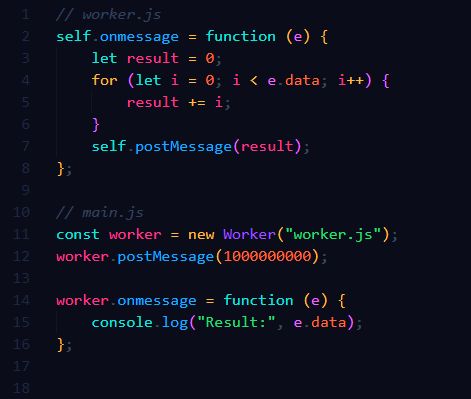
When your app performs complex computations or processes large datasets, you may experience a frozen UI. This happens because JavaScript is single-threaded, meaning long-running tasks block the main thread. 𝐖𝐨𝐫𝐤𝐞𝐫 𝐭𝐡𝐫𝐞𝐚𝐝𝐬 (or Web Workers) solve this by moving heavy operations off the main thread, keeping the UI responsive.
→ 𝐖𝐡𝐲 𝐔𝐬𝐞 𝐈𝐭: Offload heavy computations to improve performance.
→ 𝐖𝐡𝐞𝐧 𝐭𝐨 𝐔𝐬𝐞 𝐈𝐭: Whenever your app has computationally expensive tasks like large data manipulation, image processing, or running algorithms in the background.