𝐃𝐚𝐲 𝟖𝟔 of #100DaysOfCode
- 𝑨𝒄𝒄𝒆𝒔𝒔𝒊𝒏𝒈 𝑻𝒐𝒌𝒆𝒏𝒔 𝒊𝒏 𝑯𝑻𝑻𝑷-𝑶𝒏𝒍𝒚 𝑪𝒐𝒐𝒌𝒊𝒆𝒔 (𝑭𝒓𝒐𝒏𝒕𝒆𝒏𝒅) -
Now that you know how to generate and store 𝐚𝐜𝐜𝐞𝐬𝐬 𝐭𝐨𝐤𝐞𝐧𝐬 𝐚𝐧𝐝 𝐫𝐞𝐟𝐫𝐞𝐬𝐡 𝐭𝐨𝐤𝐞𝐧𝐬 using 𝐇𝐓𝐓𝐏-𝐨𝐧𝐥𝐲 𝐜𝐨𝐨𝐤𝐢𝐞𝐬, let’s see how to access and use these tokens on the frontend.
→ 𝗔𝘂𝘁𝗼𝗺𝗮𝘁𝗶𝗰 𝗧𝗿𝗮𝗻𝘀𝗺𝗶𝘀𝘀𝗶𝗼𝗻 𝗼𝗳 𝗖𝗼𝗼𝗸𝗶𝗲𝘀
One of the key advantages of using 𝐇𝐓𝐓𝐏-𝐨𝐧𝐥𝐲 𝐜𝐨𝐨𝐤𝐢𝐞𝐬 is that the browser automatically sends them with every request to your backend. You don’t need to manually attach the token to your headers like you would if you were storing the token in localStorage.
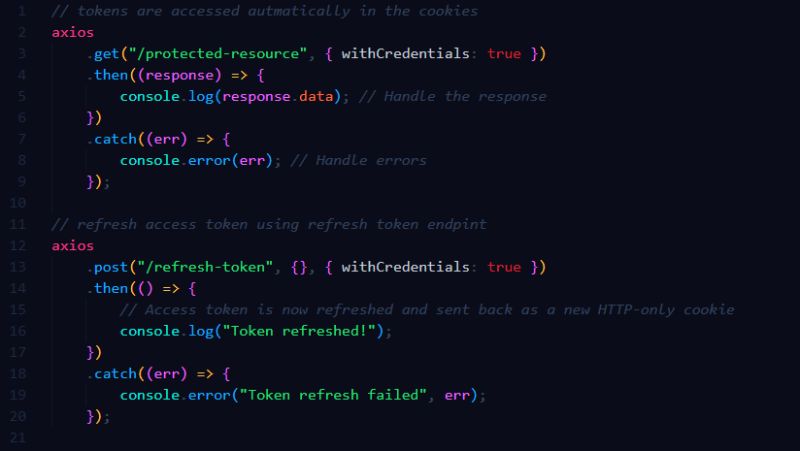
In the attached snippet, 𝐰𝐢𝐭𝐡𝐂𝐫𝐞𝐝𝐞𝐧𝐭𝐢𝐚𝐥𝐬: 𝐭𝐫𝐮𝐞 is crucial here. It ensures that cookies are included with the request.
→ 𝗠𝗮𝗸𝗶𝗻𝗴 𝗮 𝗧𝗼𝗸𝗲𝗻 𝗥𝗲𝗳𝗿𝗲𝘀𝗵 𝗥𝗲𝗾𝘂𝗲𝘀𝘁
If the access token expires, your frontend can send a request to the 𝐫𝐞𝐟𝐫𝐞𝐬𝐡 𝐭𝐨𝐤𝐞𝐧 𝐞𝐧𝐝𝐩𝐨𝐢𝐧𝐭 to get a new access token. Since the refresh token is stored in an HTTP-only cookie, the browser will automatically send it along with the request.
→ 𝗕𝗲𝗻𝗲𝗳𝗶𝘁𝘀 𝗼𝗳 𝗨𝘀𝗶𝗻𝗴 𝗛𝗧𝗧𝗣-𝗢𝗻𝗹𝘆 𝗖𝗼𝗼𝗸𝗶𝗲𝘀 𝗼𝗻 𝘁𝗵𝗲 𝗙𝗿𝗼𝗻𝘁𝗲𝗻𝗱
- 𝐀𝐮𝐭𝐨𝐦𝐚𝐭𝐢𝐜 𝐌𝐚𝐧𝐚𝐠𝐞𝐦𝐞𝐧𝐭: Cookies are automatically included with every request to your server, so you don’t need to manually add the token to headers.
- 𝐒𝐞𝐜𝐮𝐫𝐢𝐭𝐲: Since the tokens are stored in 𝐇𝐓𝐓𝐏-𝐨𝐧𝐥𝐲 𝐜𝐨𝐨𝐤𝐢𝐞𝐬, they can’t be accessed or modified by client-side JavaScript, making them more secure than tokens stored in
localStorage.
By using 𝐇𝐓𝐓𝐏-𝐨𝐧𝐥𝐲 𝐜𝐨𝐨𝐤𝐢𝐞𝐬 for tokens, your frontend can focus on making API requests without worrying about managing tokens manually, while keeping your authentication system more secure.
Now your app is ready to handle 𝐬𝐞𝐜𝐮𝐫𝐞, 𝐬𝐞𝐚𝐦𝐥𝐞𝐬𝐬 𝐚𝐮𝐭𝐡𝐞𝐧𝐭𝐢𝐜𝐚𝐭𝐢𝐨𝐧!